
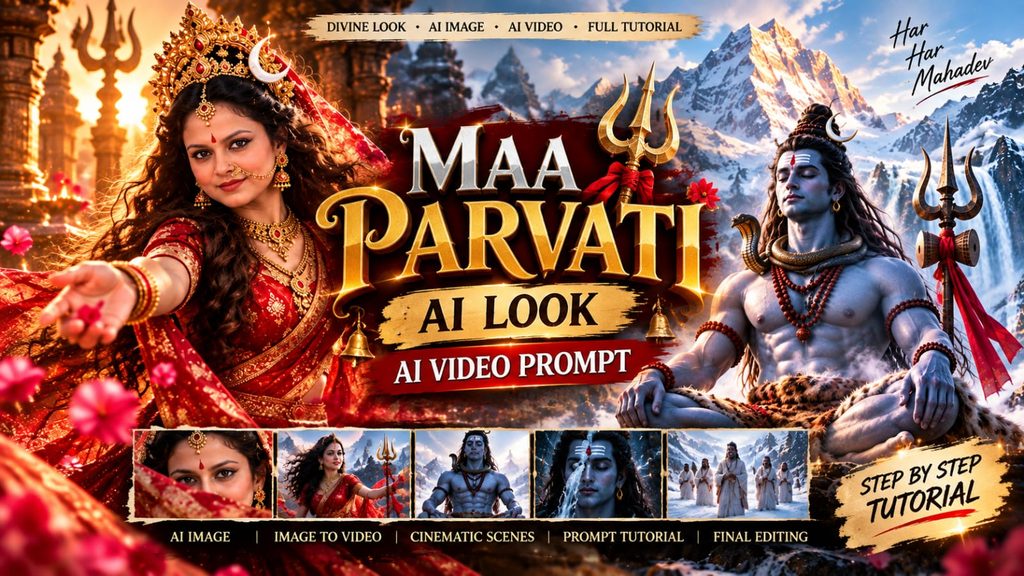
👋 About
AI tools are changing the way we create cinematic and devotional content. In this tutorial, I’ll show you how to turn a simple reference photo into a Maa Parvati-inspired AI look and then transform those images into beautiful cinematic video scenes.
We’ll create different visuals inspired by the story and atmosphere of Maa Parvati and Mahadev — from Parvati standing among the snowy Himalayas and carrying a powerful Trishul, to Mahadev meditating on Mount Kailash with the sacred Ganga flowing from his matted hair.
You’ll also learn how to maintain a consistent character look, write detailed AI image and image-to-video prompts, generate individual cinematic clips, and finally combine them in an editing app to create a complete vertical Reel.
This guide is designed as a step-by-step creative workflow, so you can use the prompts as inspiration, customize the details with your own reference image, and create your own unique AI devotional video.
❓ What Will You Create in This Tutorial?
The final video brings together cinematic Himalayan landscapes, Maa Parvati-inspired visuals, Mahadev on Kailash, the flowing Ganga, Trishul sequences, sages, divine close-ups, realistic clothing movement, and dramatic lighting. Each scene is generated separately and then edited according to the music and storytelling flow.
✨ Workflow:
Reference Photo → AI Image → Scene Prompts → Image-to-Video → Generate Clips → Final Editing → Instagram Reel
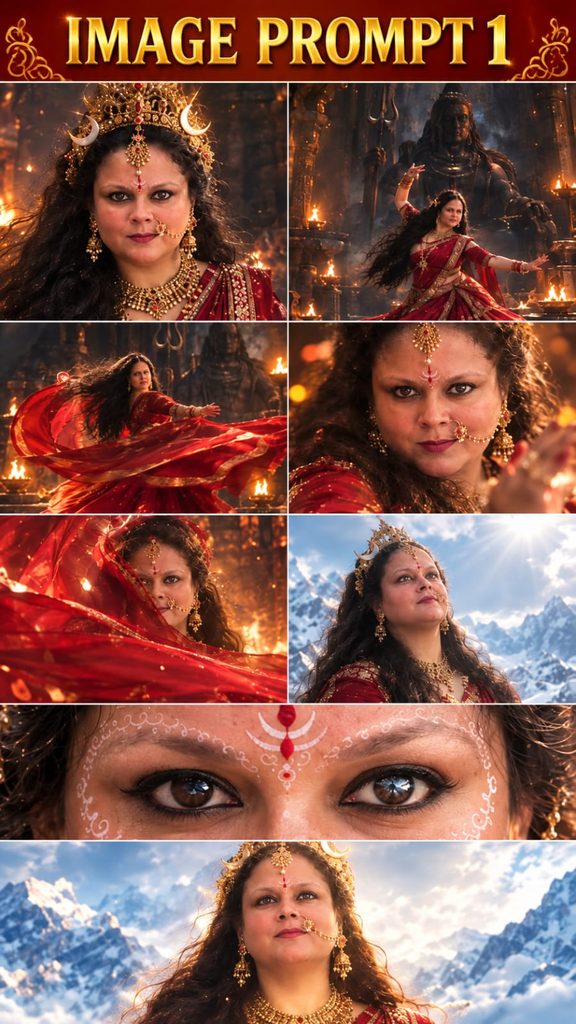
Scene 1: Create Maa Parvati-Inspired Himalayan Look 🏔️✨
Image Generation Prompt:
Use my uploaded photo as the exact facial identity reference. Transform me into a photorealistic Maa Parvati-inspired divine woman standing majestically in the snowy Himalayas. Preserve my real face, facial structure, eyes, nose, lips, natural skin tone and recognizable identity; do not replace my face with another woman.
Dress me in an elegant deep-red traditional saree with intricate antique-gold embroidery and rich golden borders, traditional gold necklace, earrings, bangles, maang tikka and a delicate traditional nath with chain. Give me long, naturally flowing black hair and an ornate golden divine crown decorated with subtle crescent-moon motifs.
I am standing confidently on a snow-covered Himalayan path surrounded by massive Mount Kailash-inspired peaks, icy cliffs and drifting mountain mist. My expression is calm, powerful and divine, looking slightly toward the camera. Cold Himalayan wind gently moves my hair and red saree pallu.
Create dramatic cinematic lighting with soft golden sunlight breaking through blue-grey clouds, illuminating my face and jewellery while the distant mountains remain cool blue and white. Add subtle floating snow particles and atmospheric mist for depth.
Full-body cinematic composition, slightly low camera angle, realistic human proportions, natural hands, realistic skin pores, highly detailed jewellery and fabric, physically realistic snow, volumetric sunlight, shallow cinematic depth of field, epic Indian mythology-inspired atmosphere, photorealistic, ultra-detailed, cinematic film still, vertical 9:16, no text, no watermark.
Avoid: face change, different identity, artificial plastic skin, cartoon/anime appearance, extra fingers, malformed hands, duplicate person, excessive divine glow, oversized crown, blurry face or unrealistic body proportions.
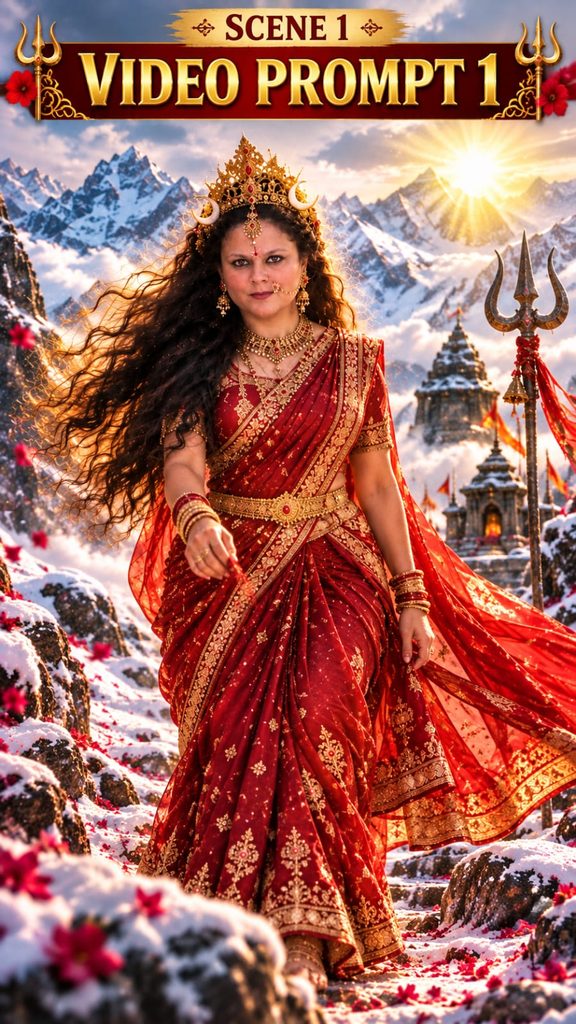
Scene 1 — Maa Parvati in Himalayas | 6-Second Video Prompt
Use the generated Maa Parvati-inspired image as the exact starting frame and character reference. Maintain the same face, identity, skin tone, red-and-gold saree, jewellery, crown and hairstyle throughout the entire video.
Create a 6-second photorealistic cinematic shot in the majestic snowy Himalayas. Maa Parvati slowly and gracefully walks forward toward the camera with a calm yet powerful divine expression, keeping her gaze naturally toward the camera. A cold Himalayan breeze gently moves her long black hair, red saree pallu and jewellery.
The camera performs a smooth slow backward tracking shot with a subtle push-in toward her face, creating an epic cinematic presence. Snow particles drift naturally through the air, soft mist moves between the distant mountain peaks, and warm golden sunlight gradually breaks through the clouds, illuminating her face and creating a beautiful contrast with the cool blue Himalayan landscape.
Keep movements slow, graceful and realistic—natural footsteps, subtle blinking and breathing, realistic hair and fabric physics, delicate jewellery movement, volumetric sunlight, cinematic depth of field and realistic snow. Epic Indian mythology-inspired devotional atmosphere, photorealistic film look, vertical 9:16, 6 seconds.
No face morphing, no identity change, no sudden camera movement, no extra limbs/fingers, no distorted hands, no floating jewellery, no exaggerated body movement, no text, no captions, no watermark, no BGM.
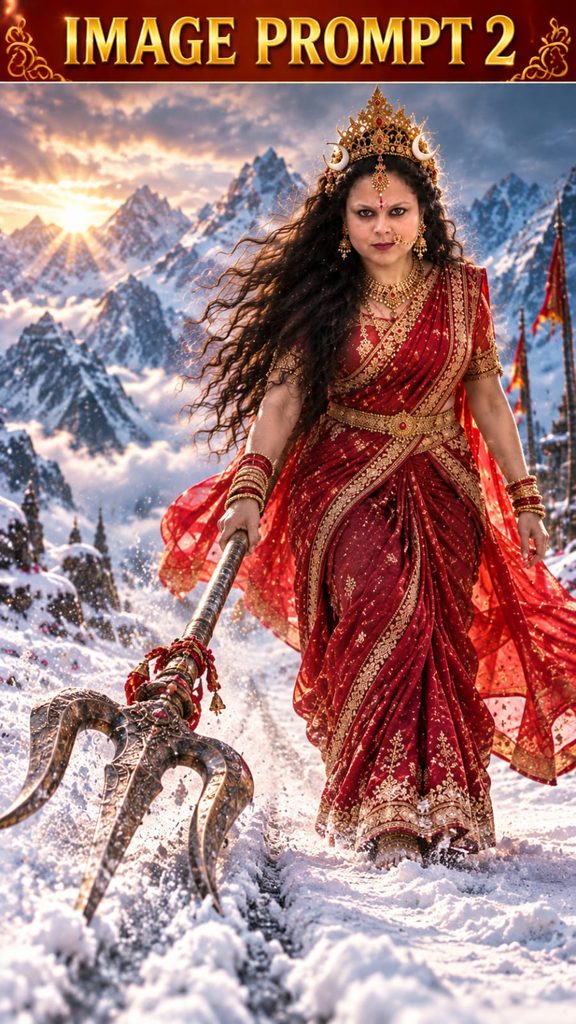
🖼️ IMAGE PROMPT 2 — Parvati Dragging Trishul
Use my uploaded photo as the exact facial identity reference. Transform me into a photorealistic Maa Parvati-inspired divine warrior in the snowy Himalayas. Preserve my recognizable face, facial structure, eyes, nose, lips, natural skin tone and realistic skin texture.
Dress me in a majestic deep-red saree with intricate antique-gold embroidery, traditional gold jewellery, bangles, maang tikka, nath with chain and an ornate golden crown with subtle crescent-moon details. Long black hair flows dramatically in the cold Himalayan wind.
Show me walking powerfully toward the camera while dragging a massive ancient metallic Trishul through the snow with one hand. The lower tip of the Trishul touches and cuts through the frozen ground, leaving a visible trail behind it. My hand grips the long Trishul shaft firmly.
My expression is fierce, fearless and intensely powerful, with my eyes looking directly toward the camera. Capture the scene from a dramatic slightly low camera angle, making the character and Trishul appear majestic.
Snow sprays around the scraping Trishul, tiny ice particles float through the air, red saree and hair move naturally in the wind, towering snow-covered Himalayan mountains fill the background. Cold blue environment contrasted with subtle warm golden divine light on the face.
Photorealistic cinematic film still, realistic metal Trishul, realistic hands and fingers, detailed red fabric and gold embroidery, natural skin pores, atmospheric mist, volumetric lighting, epic Indian mythology-inspired aesthetic, vertical 9:16, ultra-detailed, no text, no watermark.
Avoid: face change, duplicate person, extra arms or fingers, deformed hands, floating Trishul, incorrect Trishul shape, Trishul held like a weapon toward the camera, cartoon appearance, excessive glow or unrealistic body proportions.
🎬 VIDEO PROMPT 2 — Trishul Dragging Sequence | 6 sec
Use the generated image as the exact first-frame and character reference. Maintain absolute facial identity, costume, jewellery, hairstyle, crown and Trishul consistency throughout the clip.
Create a 6-second photorealistic cinematic sequence. Maa Parvati walks slowly but powerfully forward through the snowy Himalayan landscape while dragging the massive Trishul behind and slightly beside her. One hand maintains a firm grip on its long shaft while the metal tip continuously scrapes across the frozen ground.
Begin with a dramatic low-angle close shot of the Trishul scraping through snow, sending small realistic snow and ice particles outward. Smoothly reveal her hand gripping the Trishul, then transition into a full-body tracking shot as she walks toward the camera.
Her deep-red saree pallu and long black hair blow dramatically but naturally in the Himalayan wind. The camera slowly tracks backward while she approaches. Move into a brief cinematic close-up of her face: she looks directly into the camera with a fierce, fearless and commanding expression, with subtle natural blinking and breathing.
Finish with a powerful low-angle composition showing Maa Parvati, the dragged Trishul and enormous snowy Himalayan peaks behind her. Realistic footsteps in snow, realistic Trishul weight and friction, natural cloth/hair physics, subtle snow particles, atmospheric mist, cinematic motion blur and dramatic cold-blue lighting with soft golden highlights.
Vertical 9:16, 6 seconds, photorealistic, smooth continuous cinematic movement. No face morphing, no identity change, no extra limbs/fingers, no floating Trishul, no unrealistic weapon movement, no text, captions, watermark or BGM.
🖼️ IMAGE PROMPT 3 — Parvati Meets the Sages
Use my uploaded photo as the exact facial identity reference for Maa Parvati. Preserve my recognizable face, facial structure, eyes, nose, lips, skin tone and realistic skin texture. Keep the same deep-red saree with intricate gold embroidery, traditional gold jewellery, nath, maang tikka and long flowing black hair from the previous scenes.
Create a photorealistic cinematic scene in a vast frozen Himalayan valley. Maa Parvati stands in the foreground, slightly turned to one side, looking toward a group of ancient Himalayan sages walking slowly toward her across the snow. The sages wear simple white/off-white traditional robes, rudraksha beads and have natural long hair and beards.
The central elderly sage has long silver-white hair and a flowing white beard, peaceful wise eyes and a spiritually powerful presence. He stands slightly ahead of the other sages and raises one hand in a gentle blessing gesture toward Parvati.
Compose the image like an epic movie frame: partially show Maa Parvati from behind/over-the-shoulder in the foreground while the elderly sage and other sages approach from the distance. Massive snow-covered Himalayan peaks rise behind them, with drifting snow, cold mist and sunlight breaking dramatically through the clouds.
Red saree against the white-and-blue landscape, realistic snow footprints, natural wind movement in hair and clothing, volumetric sunlight, atmospheric depth, photorealistic faces, realistic hands, cinematic depth of field, epic Indian mythology-inspired atmosphere, ultra-detailed film still, vertical 9:16, no text, no watermark.
Avoid: duplicate sages, identical faces, distorted hands, extra fingers/limbs, face change on Parvati, cartoon appearance, modern clothing, exaggerated magical effects or unrealistic body proportions.
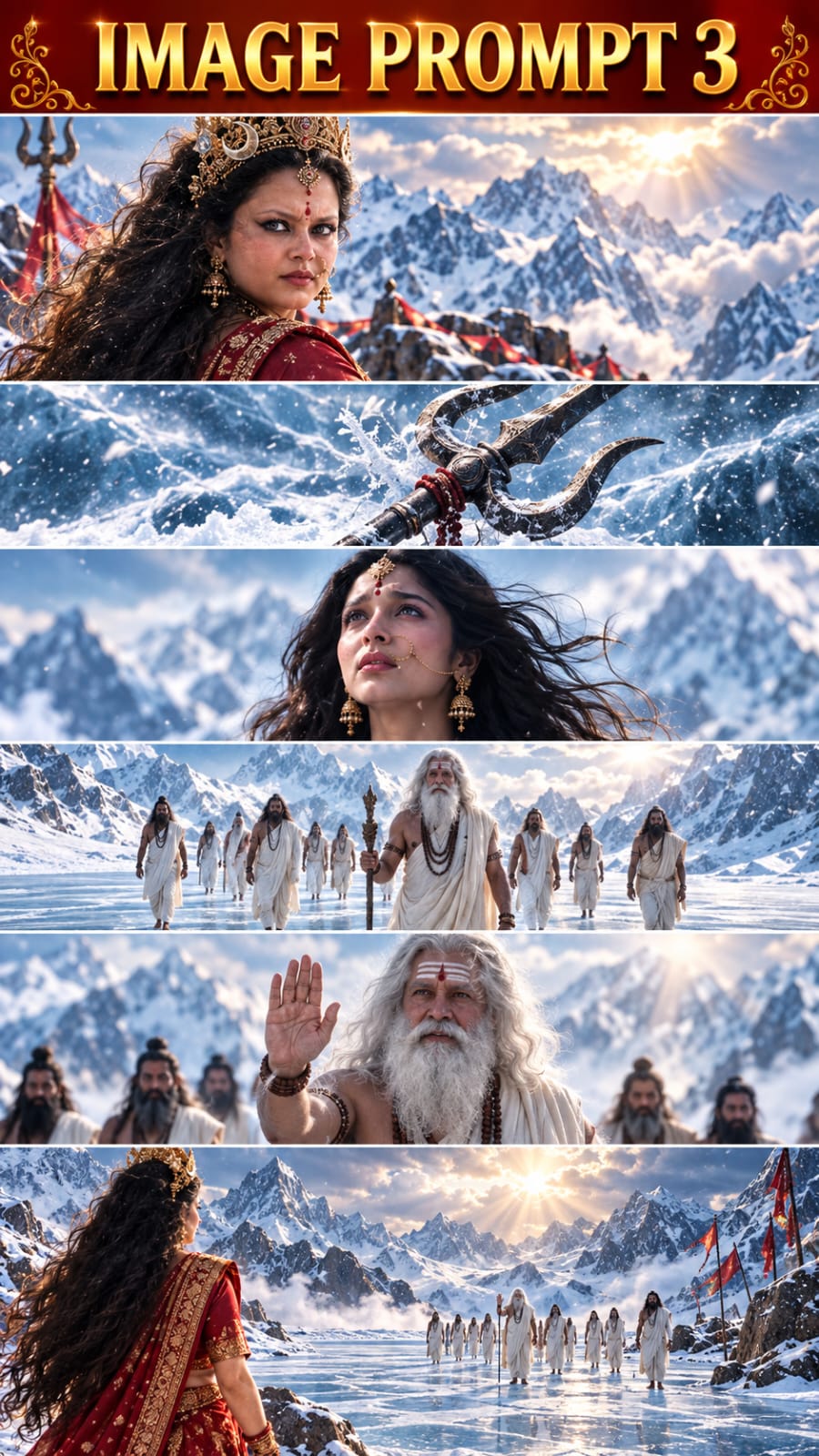
🎬 VIDEO PROMPT 3 — Parvati Meets the Sages | 6 sec
Use the generated image as the exact visual and character reference. Maintain Maa Parvati’s facial identity, red-and-gold saree, jewellery, hairstyle and overall appearance consistently throughout the clip.
Create a 6-second photorealistic cinematic sequence in a frozen Himalayan valley. Begin from behind Maa Parvati in an elegant over-the-shoulder shot as she looks across the valley. In the distance, a small group of ancient sages slowly walks toward her through the snow.
The camera smoothly moves past Parvati and gently pushes toward the sages. Their robes and long hair move naturally in the cold Himalayan wind as their feet leave subtle footprints in the snow.
Briefly focus on the elderly central sage with long white hair and beard. He stops, looks peacefully toward Maa Parvati and slowly raises his right hand in a calm blessing gesture.
Cut back to a subtle close-up of Parvati watching him with a serious, emotional and respectful expression. Her hair and red saree pallu gently move in the wind.
End with an epic wide cinematic shot showing Maa Parvati on one side and the sages across the frozen valley, surrounded by enormous Himalayan mountains as golden sunlight breaks through the clouds.
Realistic walking, natural blinking and breathing, realistic cloth/hair physics, drifting snow, moving mist, subtle footprints, volumetric sunlight, smooth camera movement and cinematic depth of field. Vertical 9:16, 6 seconds, photorealistic. No face morphing, duplicate people, distorted hands, sudden movement, text, captions, watermark or BGM.
🖼️ IMAGE PROMPT 4 — Mahadev on Kailash + Sacred Ganga
Create an epic photorealistic cinematic portrayal of Lord Shiva on Mount Kailash. Lord Shiva is seated peacefully in deep meditation on a snow-covered rocky platform, surrounded by enormous Himalayan peaks, drifting clouds and cold mountain mist.
Show Shiva with a powerful yet serene divine appearance: natural blue-toned skin, strong realistic facial features, long thick matted jata tied above his head, sacred Tripundra markings on the forehead, rudraksha malas around his neck and arms, tiger-skin cloth, and a realistic cobra resting naturally around his neck. A majestic ancient metallic Trishul stands beside him.
The most important visual element is Shiva’s jata and the sacred River Ganga. From the upper portion of his matted hair, a small luminous stream of crystal-clear sacred water emerges naturally, winds through his jata and then transforms into a beautiful flowing stream cascading downward beside him. Individual water droplets and splashes catch the sunlight while the river continues toward the snowy landscape below.
Frame Shiva in a majestic slightly low-angle cinematic composition with Mount Kailash towering behind him. Cold blue Himalayan light surrounds the environment while subtle warm golden sunlight breaks through dramatic clouds and illuminates Shiva’s face, jata, Ganga and Trishul.
Hyper-realistic water physics, detailed jata strands, realistic cobra scales, rudraksha texture, detailed metal Trishul, natural snow and ice, atmospheric fog, volumetric sunlight, cinematic depth of field, devotional Indian mythology-inspired atmosphere, high-end movie still, vertical 9:16, ultra-detailed, no text, no watermark.
Avoid: multiple heads or arms, duplicate Trishul, extra snakes, distorted anatomy, cartoon appearance, aggressive expression, oversized river coming directly from the forehead, water covering Shiva’s face, unrealistic neon glow or modern objects.
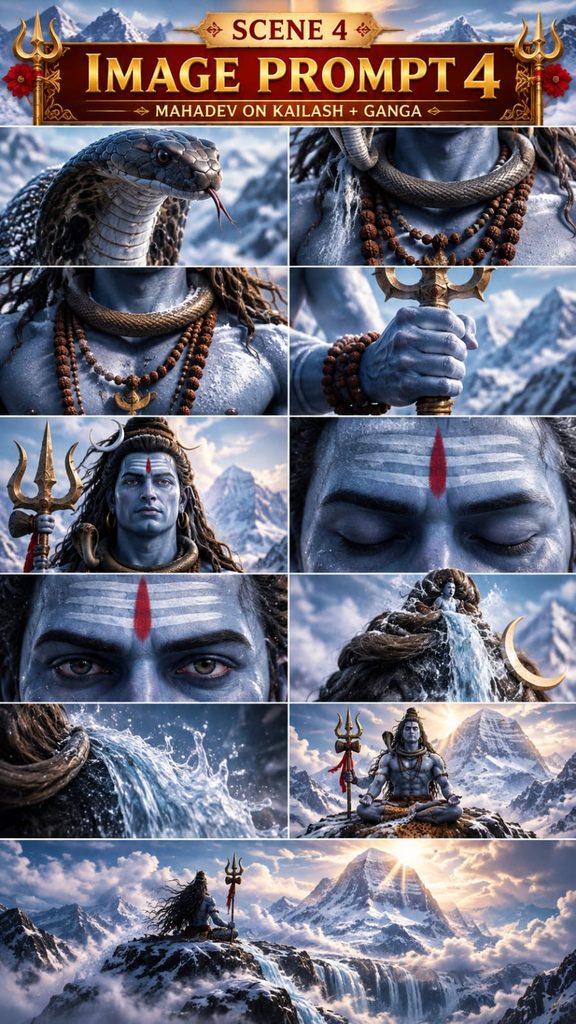
🎬 VIDEO PROMPT 4 — Mahadev + Ganga | 10 Seconds
Use the generated image as the exact visual reference. Maintain absolute consistency of Lord Shiva’s face, blue-toned skin, jata, cobra, rudraksha, Tripundra, clothing and Trishul throughout the entire sequence.
Create a 10-second photorealistic cinematic Indian mythology sequence on Mount Kailash.
Begin with a dramatic macro close-up of the cobra around Shiva’s neck, showing subtle natural breathing and highly detailed scales. The camera slowly moves downward across the rudraksha beads and Shiva’s chest before revealing his hand firmly but calmly gripping the ancient Trishul.
Smoothly transition upward into a powerful portrait of Lord Shiva. Move into an extreme close-up of his Tripundra and closed eyes. His eyes slowly and peacefully open while tiny snow particles drift through the air.
Pull back to reveal Lord Shiva meditating peacefully on Mount Kailash, surrounded by enormous snowy Himalayan peaks and moving clouds.
The camera then slowly rises toward Shiva’s matted jata. Show a detailed close-up as crystal-clear sacred water begins to emerge naturally from within his jata. The small stream grows gradually, flowing through the locks of hair before cascading gracefully downward as the sacred River Ganga.
Follow the flowing water briefly in slow motion: realistic droplets, splashes and sunlight reflections, with physically accurate water movement.
Finish with an epic wide low-angle shot of Shiva meditating on Kailash, his Trishul beside him and the sacred Ganga flowing downward from his jata into the Himalayan landscape. Clouds slowly separate behind Mount Kailash as brilliant golden-white sunlight creates a subtle divine halo around Shiva.
Photorealistic skin and hair, realistic cobra movement, physically accurate flowing water, natural snow particles, moving mist, volumetric sunlight, cinematic depth of field, slow controlled camera movement and majestic devotional atmosphere. Vertical 9:16, 10 seconds. No rapid cuts, no anatomy distortion, no extra limbs, no duplicate snake or Trishul, no excessive supernatural glow, no text, captions, subtitles, watermark or BGM.
🛠️ How to Create the AI Images
- Open ChatGPT and start a new chat.
- Upload a clear photo of yourself. Face front-facing aur properly visible ho to better results milte hain.
- Website se jis scene ka Image Prompt chahiye, usse copy karo.
- ChatGPT mein apni uploaded photo ke saath Image Prompt paste karo.
- Generate the image.
- Result mein face ya costume change ho raha ho to prompt mein add karo: “Keep my exact facial identity, skin tone, facial features and character design unchanged.”
- Isi process ko Scene 1, Scene 2, Scene 3 aur Scene 4 ke liye repeat karo.
- Har final image ko save kar lo. Ye images next step mein Google Flow mein video reference ke रूप में use hongi.
🎬 How to Convert Your AI Image Into a Video Using Google Flow
Google Flow image ko animate karne ke liye uploaded image, Frames, ya Ingredients/reference images use kar sakta hai. Video generate karte waqt orientation, model aur clip length bhi select ki ja sakti hai.
- Open Google Flow and create a new project.
- Generation type ko Video par switch karo.
- Agar tum ek generated still image ko animate karna chahti ho, us image ko upload/select karo aur Animate ya Frames → Add start frame use karo.
- Website se matching Video Prompt copy karke prompt box mein paste karo.
- Prompt mein mainly motion describe karo—jaise: “She slowly walks toward the camera, saree and hair move in the wind, camera tracks backward, snow particles drift naturally.”
- Vertical / portrait orientation select karo for Instagram Reels.
- Apne chosen model ke supported clip length ke hisaab se 4s, 6s ya 8s choose karo. For example, Veo 3.1 Lite currently supports 4-, 6- and 8-second text/frame-to-video generations; feature support model ke according vary karta hai.
- Generate par tap/click karo.
- Agar first result perfect nahi hai, movement ko simpler karke regenerate karo. Face consistency ke liye same reference image/ingredient reuse karo; Flow visual references ko clips ke across reuse karne deta hai.
- Har scene ka best clip save/download kar lo.
🎥 Same Character Across Multiple Scenes
Parvati wale sabhi clips mein same reference image ko Ingredient/reference ke रूप में reuse karna useful rahega. Prompt mein likho:
Use this woman as the exact character reference. Maintain the same facial identity, skin tone, hairstyle, jewellery and costume throughout the clip.
Google Flow ka Ingredients workflow uploaded visual references ko subsequent generations mein reuse karne ke liye bana hai.
✂️ Combine All Clips Into One Reel
Flow ke Scenebuilder mein multiple clips ko add, reorder, trim aur preview karke ek sequence banaya ja sakta hai, aur finished scene download bhi kiya ja sakta hai.
Ya tum clips ko apne preferred editing app mein import karke:
Scene 1 → Scene 2 → Scene 3 → Scene 4
order mein lagao, song/audio add karo, lyrics ke according cuts sync karo, unnecessary portions trim karo, simple transitions use karo aur final video 9:16 / 1080×1920 mein export karo.
💡 Quick Tip
Video prompt ko overly complicated mat banao. Character + one main action + camera movement + environment movement best combination hota hai.
Example:
Maa Parvati walks slowly toward the camera while dragging the Trishul through the snow. Her hair and red saree move naturally in the wind. Snow sprays from the scraping Trishul while the camera smoothly tracks backward. Keep her face and costume unchanged. Photorealistic cinematic movement, vertical 9:16.
Tumhare website article mein is section ka heading “🎨 Create the AI Image & Convert It Into a Cinematic Video” achha lagega.
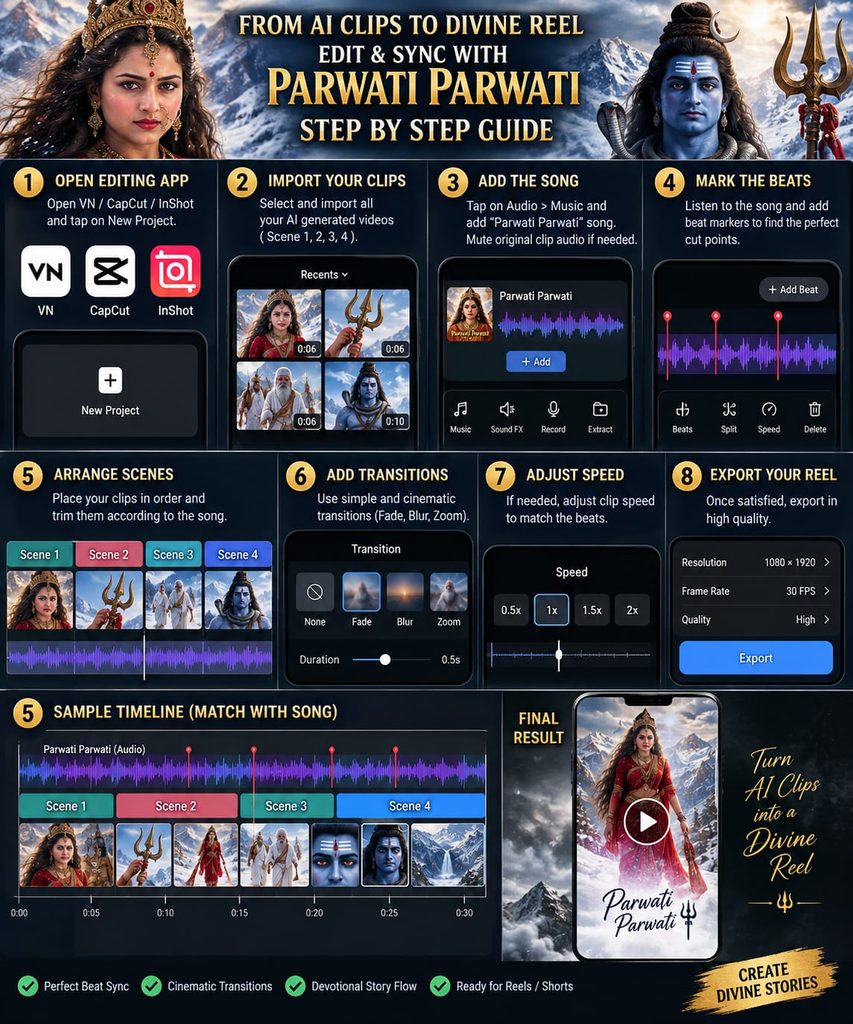
🎵 How to Sync AI Video Clips with “Parwati Parwati” Song
AI video clips generate karne ke baad final step hai unhe song ke lyrics aur beats ke saath sync karna. Iske liye VN, CapCut ya InShot use kar sakte hain. Best result ke liye pehle saare generated clips phone mein save karein aur unhe Scene 1, Scene 2, Scene 3, Scene 4 ke order mein arrange karein.
🎬 Step 1 — Create a New Project
VN / CapCut / InShot open karein → New Project select karein → apne saare AI-generated clips import karein.
Project ko 9:16 vertical format mein rakhein, jo Instagram Reels aur YouTube Shorts ke liye suitable hai.
🎧 Step 2 — Add the Song
Music/Audio section open karke legally available “Parwati Parwati” audio add karein. Agar aap Instagram ke licensed audio ka use kar rahe hain, video ko pehle visuals ke saath edit karke Instagram par official audio add karna bhi practical option hai.
Original AI clips mein unwanted sound ho to clip volume 0% / Mute kar dein.
🎵 Step 3 — Mark the Important Beats
Song ko ek baar beginning se end tak sunein. Har beat par scene change karna zaroori nahi hai. Instead, important lyrics, strong beats, musical hits aur emotional moments mark karein.
VN mein Beats/BeatsClips automatic ya manual beat detection support karta hai. � CapCut mein bhi cuts ko rhythm/beat ke saath align kiya ja sakta hai. � InShot mein Beat Marker workflow bhi available hai.
VN Video Editor +1
CapCut
YouTube
🔱 Step 4 — Match Our 4 Scenes with the Song
Ab apne visuals ko lyrics ke meaning aur song ki intensity ke according arrange karein:
Scene 1 — Maa Parvati Introduction: Song ke soft/introduction portion par Maa Parvati ka Himalayan reveal, face close-up aur flowing saree shots rakhein. Starting shots ko slightly longer rakhein taaki divine cinematic introduction mile.
Scene 2 — Parvati Dragging the Trishul: Jaise hi song powerful hota hai, Trishul reveal → hand gripping Trishul → walking shot → snow mein Trishul drag → fierce face close-up use karein. Strong beat par Trishul ka snow se takrana/scrape hona especially impactful lagega.
Scene 3 — Parvati Meets the Sages: Song ke emotional/devotional portion mein sages walking → Parvati looking toward them → elderly sage close-up → blessing gesture → Parvati reaction → Himalayan wide shot rakhein.
Scene 4 — Mahadev on Kailash + Ganga: Song ke most divine/powerful section ke liye snake close-up → rudraksha → Trishul grip → Mahadev portrait → eyes → meditation → jata close-up → Ganga emerging from Shiva’s jata → final epic Kailash wide shot rakhein.
✂️ Step 5 — Cut Exactly on the Music
Timeline ko zoom karein. Audio waveform mein jo strong peaks dikhte hain, unke aas-paas clip ko Split karein aur next shot wahi se start karein.
Example flow:
Beat → Shiva eyes open
Beat → Trishul reveal
Beat → Parvati fierce close-up
Musical rise → Ganga begins flowing
Major musical impact → Full Mahadev/Kailash reveal
Is technique mein action aur cut dono music ke accents ke saath land karte hain, jis se reel much more cinematic feel karti hai.
CapCut
✨ Step 6 — Keep Transitions Cinematic
Agar kisi AI clip ka important action song ke beat se thoda pehle ya baad aa raha hai, clip ki speed slightly adjust karein.
Slow-motion ko Parvati close-up, sage blessing, Shiva eyes aur Ganga reveal jaise emotional moments ke liye reserve karein. Trishul dragging jaise powerful movement ko normal speed ya subtle speed ramp par rakhein.
📱 Step 8 — Final Export
Full reel ko 2–3 baar headphones ke saath preview karein. Check karein ki important lyrics par correct visual aa raha hai, cuts beats par land kar rahe hain aur koi clip unnecessarily long nahi hai.
Final export:
Aspect Ratio: 9:16
Resolution: 1080 × 1920
Frame Rate: preferably same as your generated footage, such as 24/30 FPS
Quality: High
🔥 Editing Tip
Every beat par clip change mat karo. Devotional cinematic reel mein music ko breathe karne do. Soft lyrics par longer emotional shots aur strong beats par fast cuts use karne se Parvati → Trishul → Sages → Mahadev/Ganga ki complete visual story much more powerful lagegi.
